 Alan Haining
Introduction: Why integration matters more than ever
Running a B2B operation is no small feat. You’ve got orders flying in, inventory moving out, and customers expecting fast, accurate service. But if your systems like your ERP, CRM, and B2B store aren’t speaking to each other, things start to quickly fall through the cracks.
That’s where integration comes in.
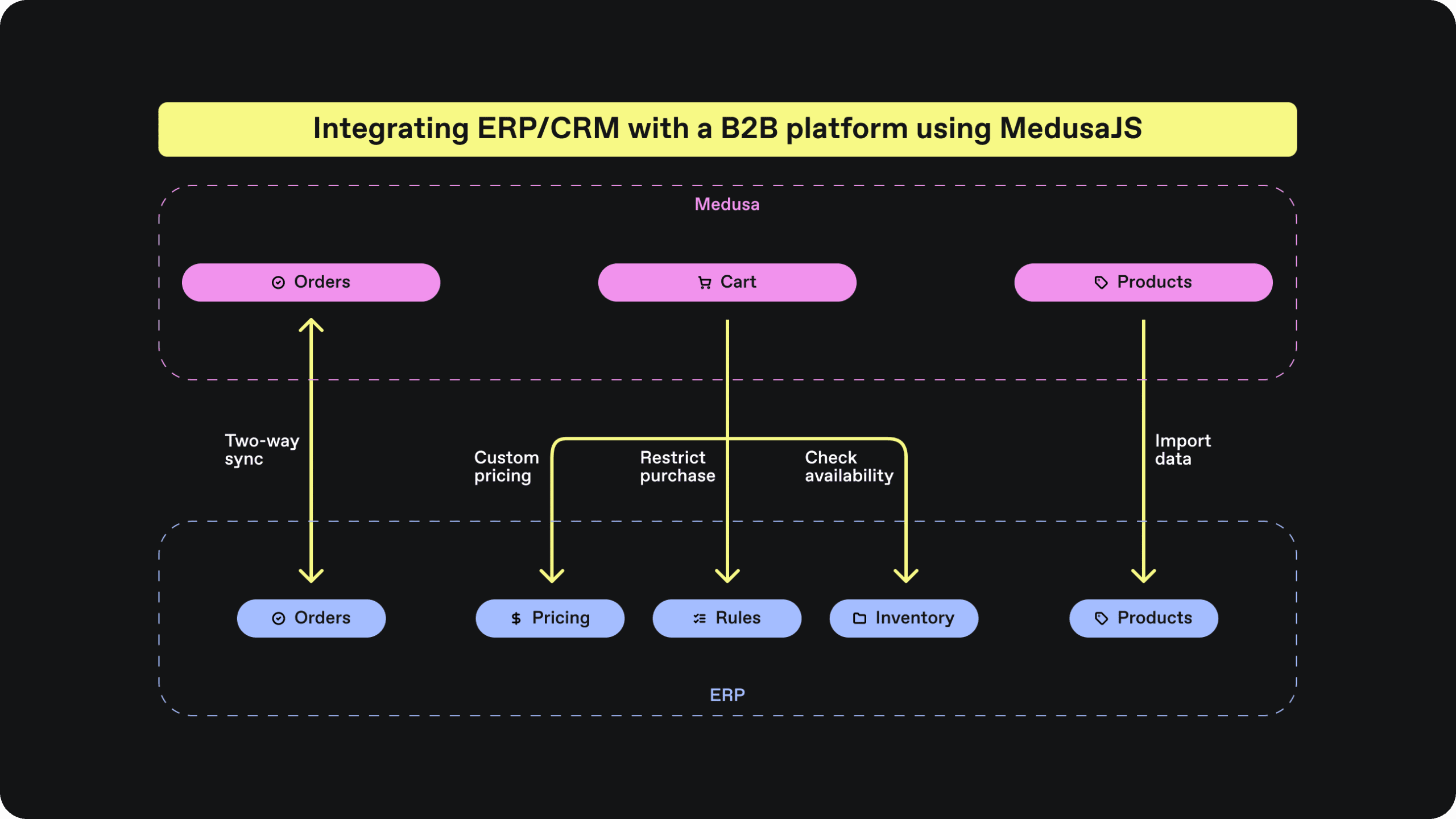
This guide will walk you through a clear, step-by-step plan to connect your ERP or CRM system with your online B2B platform using MedusaJS, an open-source commerce engine. No tech jargon, no confusing code, just a simple overview to help you make smarter decisions and streamline operations.
What is MedusaJS (And why it’s worth your attention)
MedusaJS is an open-source backend engine designed for building powerful, customisable eCommerce platforms, especially B2B.
Here’s what makes it different:
- Fully customisable: It can adapt to your existing business systems and workflows.
- Headless: It separates the frontend (what customers see) from the backend (where operations happen), offering total flexibility.
- Integration-ready: Built with modern tools and architecture that support easy integration with third-party systems like ERP and CRM software.
In short, MedusaJS gives you the freedom to build and grow your digital B2B experience without being locked into expensive, inflexible platforms.
The real-world need for integration
Imagine this common B2B scenario:
A customer places a bulk order through your MedusaJS-powered B2B store. Your sales team tracks that customer in the CRM. Meanwhile, your ERP is responsible for stock levels, invoicing, and shipping.
If these systems are disconnected:
- Orders may not reflect in the ERP in time
- Inventory may be inaccurate, causing over-selling
- Sales teams may lose visibility on customer activity
Integration fixes this. And the good news? With the right approach or the right partner, integration doesn’t have to be overwhelming.
5 simple steps to integration (without the headache)
Step 1: Identify the systems you need to connect
Start by listing:
- Your ERP (e.g. SAP, Odoo, or NetSuite)
- Your CRM (e.g. Salesforce, HubSpot, or a custom system)
- Your B2B platform (powered by MedusaJS)
💡 Tip: Focus only on the systems that are critical to your day-to-day operations. You don’t need to integrate everything at once.
Step 2: Decide what needs to be shared
Now that you’ve identified the systems, ask:
- What data should move between them?
- How often should it update?
Common examples:
| Data | From | To | Purpose |
|---|---|---|---|
| Stock Levels | ERP | MedusaJS | Keep online store accurate |
| Orders | MedusaJS | ERP | Automate fulfilment and invoicing |
| Customer Info | CRM | MedusaJS | Tailor pricing, discounts |
| Order History | MedusaJS | CRM | Improve sales follow-up |
Don’t try to do everything. Start with 1 or 2 key processes.
Step 3: Choose the right approach for your team
There are three main ways to integrate MedusaJS with your systems:
✅ Off-the-shelf connectors (If available)
Some CRMs or ERPs have existing integrations or plugins. It’s worth checking MedusaJS’s plugin library or seeing if your system has a Medusa-ready connector.
✅ Custom API integration (Most common)
This involves building a connection between MedusaJS and your other system using APIs — basically, secure bridges for data to move between tools. Your development team or an external partner can handle this.
✅ Manual sync (Short-term option)
If you’re not ready for automation, you can manually export/import CSVs between systems as a stopgap. It’s not ideal for scale, but better than total isolation.
Step 4: Plan the integration with your team
This step is crucial — it’s where leadership and operations come together with your technical staff or external provider.
Here’s what to cover:
- What business problems are we solving?
- What does success look like?
- Who is responsible for monitoring the integration?
- What’s the budget and timeline?
Don’t just “hand it off” to IT — they’ll build a better solution if they understand the business needs.
Step 5: Launch, monitor and improve
Once the integration is live:
- Test it with real data
- Monitor how well systems are syncing
- Track any errors or delays
- Schedule regular reviews with your team
Most importantly, treat this as an ongoing investment, not a one-off project.
Business benefits of integration
Here’s what you stand to gain:
✅ Operational efficiency
Reduce duplication of effort and manual entry.
✅ Fewer errors
No more missing orders or incorrect stock levels.
✅ Better customer experience
Your sales and support teams see a full customer view — not scattered data.
✅ Faster order processing
Orders flow directly from your storefront to fulfilment with minimal human input.
✅ Scalability
As you grow, your systems can grow with you — no messy workarounds.
Common pitfalls (And how to avoid them)
| Mistake | How to Avoid It |
|---|---|
| Trying to integrate everything at once | Start with one or two high-value sync points |
| No clear owner for the integration | Assign someone in your team to oversee it |
| Failing to test properly | Always run real-world test orders |
| Ignoring error logs | Ensure someone checks sync failures regularly |
What decision makers need to prepare
To make the integration smooth, ensure you’ve got:
- A clear business case
- Agreed priorities and data flows
- A capable technical partner or internal resource
- Realistic budget and timeline
- A plan to review and optimise post-launch
Final thoughts: Keep it simple, then scale
You don’t need to be technical to understand the value of integration.
When your ERP, CRM, and eCommerce platform speak the same language, your business runs smoother — and your customers feel it.
MedusaJS gives you the flexibility to integrate with the systems you already use. Start with what matters most — like syncing orders or stock — and build from there.
FAQ
Q: Is MedusaJS suitable for large B2B operations?
A: Yes. It’s highly scalable, open-source, and can be tailored to meet the demands of complex workflows.
Q: How much does it cost to integrate?
A: The platform itself is free. Your only cost is the development or consulting time needed to build the integration.
Q: What if I want to change my ERP or CRM later?
A: That’s one of MedusaJS’s strengths.