 Ante Primorac
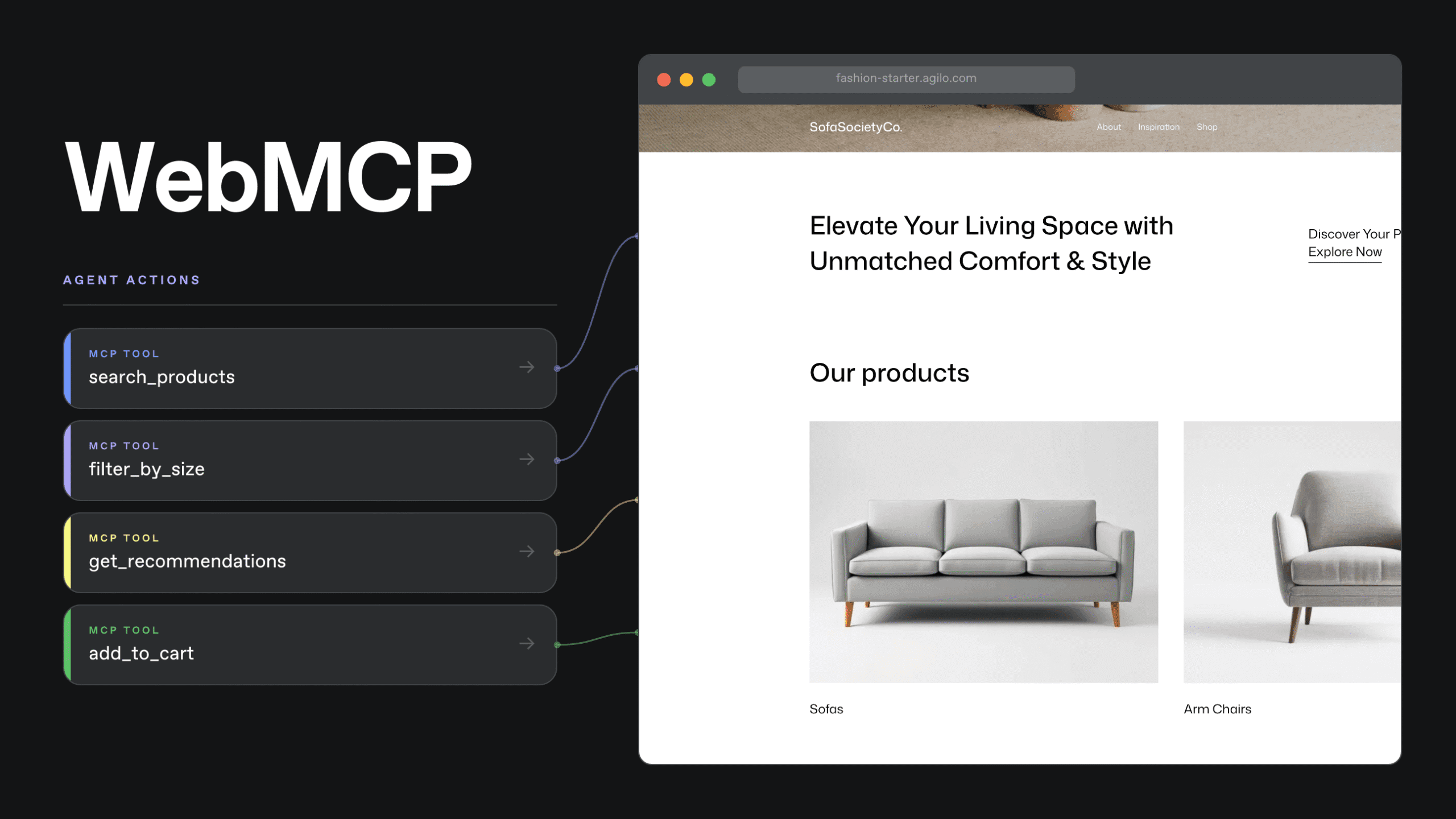
WebMCP matters because it changes what a web page can be. Instead of being limited to just something an AI agent reads, screenshots, and clicks through, the page can expose structured actions the agent can call directly while the user stays in the same interface.
This matters more than adding a chat box to a storefront. But it is still early. Today, Chrome exposes WebMCP through its early preview path, not as a settled cross-browser standard. If this direction holds, the web may become less about layering conversational UI on top of existing pages and more about giving pages an explicit contract for agent interaction.
Why web pages need more than a conversation layer
Many discussions about AI on the web still treat it as a presentation problem. The assumption is that users will want a chat panel on the page’s side, and the site only needs to decide which assistant to embed.
The harder problem sits elsewhere. A chat interface does not tell the agent what the page can do, which actions are safe, which states matter, or where the user must remain in control. It only changes how instructions are entered.
This is why many early AI web experiences feel thin. The conversation looks new, but underneath it, the agent is still trying to infer meaning from buttons, DOM structure, screenshots, and page heuristics that were built for human browsing. That works well enough for demos. It is not a strong long-term interface strategy for complex workflows.
Commerce makes this visible quickly. A shopper does not just need answers. They need product discovery, narrowing, comparison, configuration, and eventually confirmation. If the site only adds chat without exposing structured actions behind it, the assistant still has to guess how the page works.
What WebMCP changes in web interaction
WebMCP shifts the conversation from chat to capability. It allows a site to expose defined tools in the browser, using the page’s own frontend logic and current state.
An agent no longer has to treat the storefront purely as a visual interface. The page can, in a structured way, list the actions it supports and the inputs those actions expect. For example, a commerce page can expose a product search, a filter refinement action, a comparison flow, or a guided catalog view. Without that, the agent has to simulate a shopper clicking through every control.
The main consequence is reliability. An agent calling a defined tool is operating against the site’s own model of the task. An agent clicking through the interface is operating against an inferred model that may or may not match what the site actually intended.
This distinction matters even more when the user remains in the loop. WebMCP is not mainly about replacing the storefront with an autonomous agent flow. It is about giving the user and the agent shared context inside the same page, with clearer boundaries between exploration, recommendation, and confirmation.
That said, the practical rollout is still ahead of us. Right now, the better way to read WebMCP is as a direction of travel for the web platform, not as something most storefronts can rely on across browsers today.
Why WebMCP matters for the future web
If this pattern grows, the web stops being only a collection of pages for humans and APIs for backend systems. There is a third layer in the middle: web interfaces that are still human-first, but also expose bounded, structured actions to agents.
That has real design consequences.
A site designed for this model requires more defined action boundaries, predictable state changes, clearer distinctions between read and write actions, and intentional confirmation points. In essence, the site must communicate both what the user observes and what actions the system permits the user to take.
This is why the topic is bigger than AI search or assistant UX. It pushes web developers to treat the browser as an execution surface for shared human-agent workflows, rather than just a rendering layer.
We have seen similar boundary shifts before. When commerce platforms moved from tightly coupled systems to API-first architectures, the technical change was not only about endpoints. It changed how product owners and engineers thought about ownership, contracts, and where logic should live. WebMCP points to a similar shift at the interaction layer.
The important caveat is timing. Chrome is exploring this direction now, but real cross-browser use will only matter once the pattern survives the experimental phase and more of the browser market decides it is worth standardizing around.
Why commerce may feel WebMCP first
Commerce is a strong fit for this model because much of the value lies between browsing and checkout.
In a fashion storefront, a shopper often starts with a vague intent rather than a product SKU. They may want something suitable for a summer wedding, within a price range, available in a size, and without obvious embellishment. A traditional storefront can support that only indirectly through filters, search, editorial curation, and manual browsing.
An agent can help with that process, but only if it has a dependable way to work with the catalog. If the assistant has to inspect the DOM and guess how the filters interact, the experience stays brittle. If the page exposes structured discovery actions, the assistant can narrow options based on the site’s own logic.
This is one reason we added WebMCP support to our fashion starter. The point was not to bolt on an AI feature and call the storefront modern. The useful part was seeing how a storefront can begin exposing bounded catalog actions while keeping the existing page, state, and user journey intact.
That is a better signal for the future of the web than a floating assistant icon. It shows where interface design, frontend logic, and agent tooling may overlap.
What WebMCP does not solve
It would be a mistake to frame WebMCP as the new universal integration layer.
It is not the same thing as backend MCP. A backend MCP server is better suited to remote tool access, broader system integration, and workflows that do not depend on a live browser page. WebMCP is better suited to browser-local, human-in-the-loop interactions where the page itself is part of the workflow.
It also does not remove safety concerns. As soon as a site exposes meaningful actions to agents, a company has to think more clearly about trust, permissions, read-only versus write behavior, and what requires explicit user confirmation. In commerce, that boundary matters a lot. Read-heavy discovery actions are one thing. Anything that mutates cart, account, or checkout state needs a much stricter design.
So the right takeaway is not that every site now needs full agent control. The takeaway is that companies with non-trivial workflows will need to define which parts of the interface deserve structured agent access and which parts should remain tightly gated.
The real opportunity
The useful opportunity is not adding conversation to the page. It is making the page more explicit about what an agent can do.
Many companies will spend the next phase adding chat to existing interfaces and calling that strategy. Some of it will help. Much of it will age badly because the underlying page was never designed to expose reliable intent.
The stronger move is to identify a narrow layer of high-value actions and make them explicit. In commerce, that often starts with search, narrowing, comparison, and guided selection. Those are the places where agent assistance can reduce friction without immediately crossing into destructive or risky flows.
For a commerce business, that has a direct commercial consequence. Making product discovery and guided selection clearer upfront reduces the cost of testing assisted journeys later. If these flows remain hidden solely in UI behavior, each future test relies on fragile browser automation and additional custom workarounds.
To decide if this approach is worth a serious investment, don’t start by asking whether your site needs an assistant. Start by asking whether one important workflow on the page can be expressed as a bounded tool with clear inputs, clear outputs, and a visible user confirmation point. Then ask one practical question. Would that workflow still matter if browser support beyond experimental Chrome takes another year or two to arrive? If the answer is no, the timing is probably wrong. If the answer is yes, the work may still be useful because it forces the interface to become more explicit even before the standard is widely available.